
Full Type-Aware Linting for Astro, Svelte, and Vue

What are TypeScript-based languages?
Section titled “What are TypeScript-based languages?”Frontend frameworks often introduce their own languages that extend basic TypeScript syntax with custom features.
JSX-based frameworks like React and Solid.js natively work with the TypeScript compiler’s .jsx and .tsx file support.
But more extensive frameworks like Astro, Solid, and Vue that add language-specific additions and non-standard file extensions need more tooling to work well with TypeScript.
Traditional linters such as ESLint have been able to work with those languages on a syntax-only level. They can use the languages’ provided parsers to get an AST for the languages’ contents and report errors purely based on that AST.
However, syntax-only linting is often not enough to catch all bugs. Type-aware linting allows for significantly more powerful lint rules — but requires more deep integrations with TypeScript tooling.
We’re excited to say that Flint is the first modern linter with full support for typed linting on extension languages. Flint uses Volar.js to integrate TypeScript with extension languages, giving lint rules access to full type information even in embedded JavaScript expressions within language-specific files. This represents a big leap forward in linting for these languages.
no-unsafe-* rules and embedded JavaScript expressions
Section titled “no-unsafe-* rules and embedded JavaScript expressions”This applies to all type-aware rules, but @typescript-eslint/no-unsafe-* rules break more often than others.
The problem is that imports from files with custom extensions aren’t supported by TypeScript natively.
So all imports from .astro, .svelte, or .vue files are resolved to any when files are parsed using @typescript-eslint/parser.
Another major user-facing problem is that embedded JavaScript expressions in extension languages can’t be linted with type information.
For example, traditional linters would not be able to determine type information in the following Vue snippet to know whether the log(hello); call is safe.
<script lang="ts" setup>  function log(msg: string) {    console.log(msg);  }  const hello = "Hello world!";</script>
<template>  <button    @click="      () => {        log(hello);      }    "  >    Click me!  </button></template>
Notice how the @click event listener is a JavaScript expression that uses variables declared in <script>.
In order to lint this JavaScript expression properly, we need the ability to resolve the types used inside it.
Resolving types in extension languages is a difficult technical challenge. Unfortunately, it’s not solveable by straightforward techniques like concatenating all JavaScript expressions into one big file. Embedded JavaScript expressions rely on many language-specific quirks that must be taken into account.
Take, for example, the following code that uses a custom Vue component:
<template> <MyComponent v-slot="{ data }"> {{ data.text }} </MyComponent></template>data comes from MyComponent’s v-slot.
To know its type, we must resolve the type of MyComponent, extract its v-slot type, and so on.
This is why naive concatenation wouldn’t work.
Johnson Chu’s tsslint (“The lightest TypeScript semantic linting solution in JS”) used Volar.js to solve this problem, though the first problem (any-typed imports) is still present.
It supports loading Volar.js language plugins for Astro, MDX, Vue, and Vue Vine.
Thanks to this, it supports type-aware linting for these languages.
However, it lacks the TypeScript patching mechanism required to resolve custom file extensions to concrete types instead of any.
It also does not expose custom language ASTs to lint rules.
Type Checking TypeScript-Based Extension Languages
Section titled “Type Checking TypeScript-Based Extension Languages”At some point, every TypeScript-based-language author wants to type-check their language with TypeScript. There are two main difficulties here:
- Getting TypeScript to perform type-checking of syntax it’s unaware of (so they do not get skipped or throw errors)
- Resolving custom file extensions in TypeScript’s existing module resolution system (so they are not resolved to
any)
Even though TypeScript can be extended with Language Service Plugins, these plugins can’t add new custom syntax to TypeScript.
Moreover, plugins extend the editing experience only, i.e., they can’t be used in CLI workflows, such as tsc --noEmit.
That’s why TypeScript-based-language authors were required to invent hacks that could force TypeScript to understand their custom languages.
Several different approaches to this problem exist.
For example, svelte-check and ngtsc both use TypeScript compiler to type-check custom syntax.
However, they use different approaches, which makes it difficult to unify them within a single linting architecture.
Thankfully, there is a tool that can provide unified type-checking for custom languages.
Volar.js
Section titled “Volar.js”It all started as part of the Vue Language Tools initiative!
Johnson Chu developed the outstanding language support for Vue.js, and then they noticed the pattern that could be decoupled from Vue Language Tools to support almost any possible TypeScript-based language.
This is how Volar.js, the “Embedded Language Tooling Framework”, was created.
What does “embedded” mean?
Well, take for example a Vue Single File Component (SFC).
This file contains blocks with three different languages: TypeScript (<script lang="ts">), HTML (<template>), and CSS (<style lang="css">).
The HTML block also has an embedded TypeScript/JavaScript expression inside it.
<script lang="ts" setup>  // TypeScript code...</script>
<template>  <button    @click="      () => {        /* TypeScript code... */      }    "  >    <!-- HTML code... -->  </button></template>
<style lang="css">  /* CSS code... */</style>
The purpose of Volar.js is to provide language tool authors with a high-level framework that handles all the complexities — such as LSP integration, routing of LSP requests to the appropriate embedded language service, type-checking powered by TypeScript, and much more — so that they can avoid reinventing this difficult wheel again.
But we’re particularly interested in its type-checking abilities.
Volar.js allows language authors to create “language plugins” which serve two important purposes:
- They describe custom file extensions
- They translate custom language syntax into pure TypeScript code that can be type-checked by the TypeScript compiler
How Volar.js Works
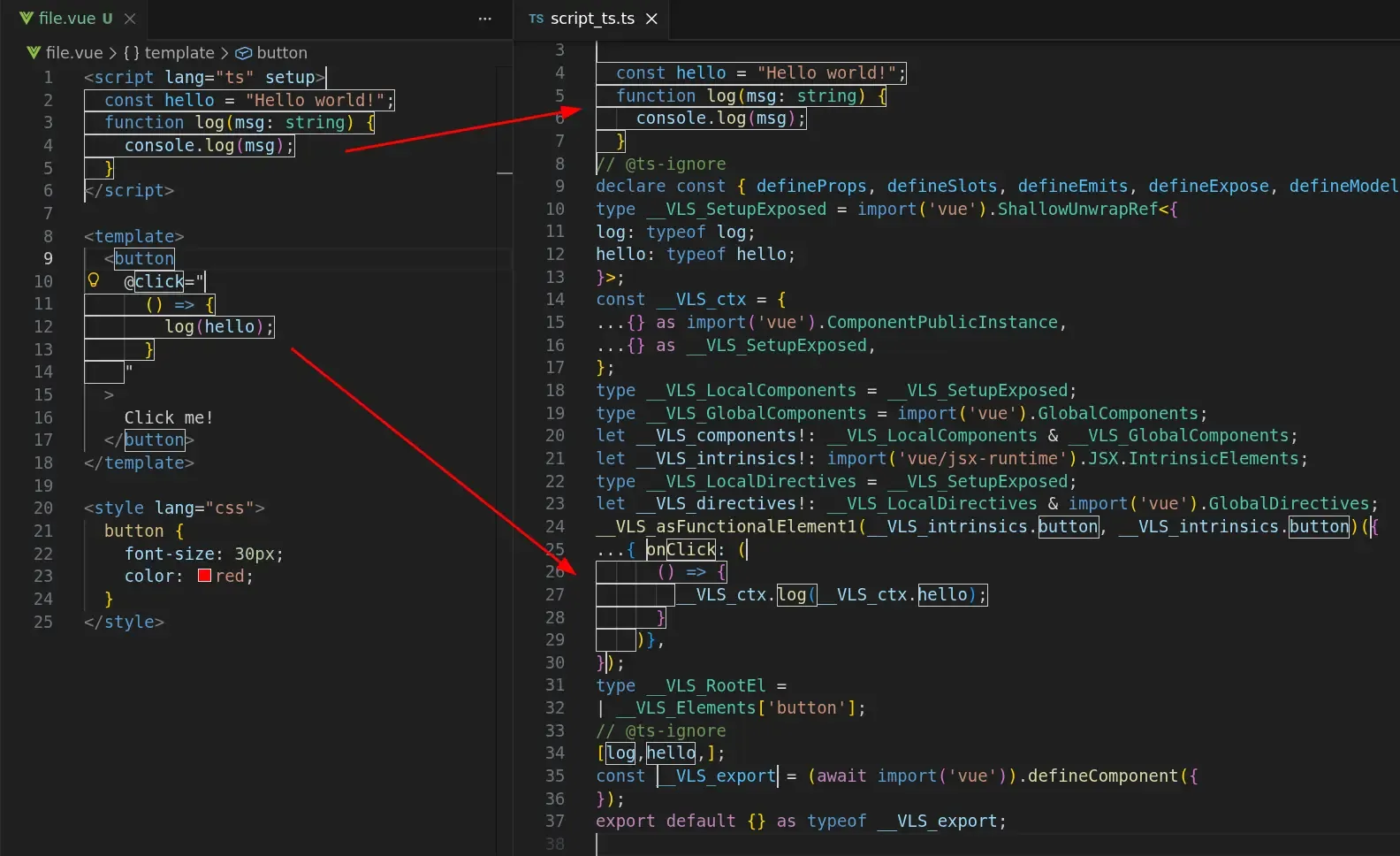
Section titled “How Volar.js Works”Here’s a screenshot showing a file.vue source file on the left, compared to the generated script_ts.ts equivalent on the right.
All of file.vue’s embedded JavaScript expressions, including code from its <script> block, are merged into that single TypeScript file.
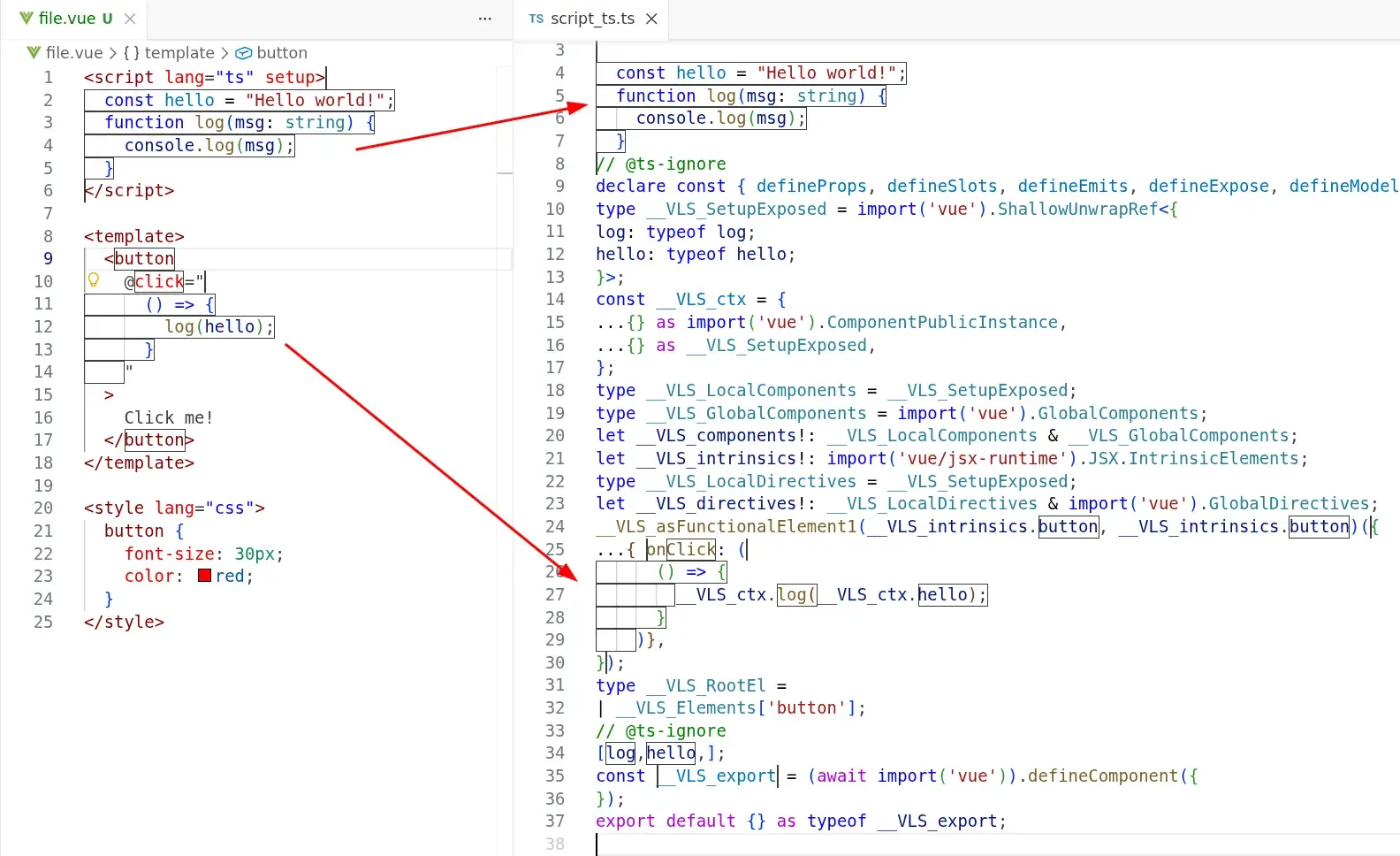
Transforming the file in this way allows its variables to be fully type-checkable.
For example, variables declared in <script setup> are prefixed with __VLS_ctx. when used in <template>.
Thanks to this, the type of every identifier used in the @click handler can be resolved to its actual value in tooling such as type-aware linting.
This is how vue-tsc type-checks .vue files internally!
How Flint utilizes Volar.js for type-aware linting
Section titled “How Flint utilizes Volar.js for type-aware linting”The new @flint.fyi/volar-language package allows creating TypeScript-based languages with ease.
In order to add support for a new language, a plugin author must provide:
- A list of custom file extensions
- Volar.js language plugin
- Optional extra properties that are passed to the rule context
We will explore three stages of linting.
Initialization
Section titled “Initialization”Initialization of a language happens implicitly.
Take a look at the example Flint config:
import { defineConfig } from "flint";import "@flint.fyi/vue";
export default defineConfig({  // ...});
It may seem that nothing is happening here; however, import '@flint.fyi/vue' performs a few very important side-effects.
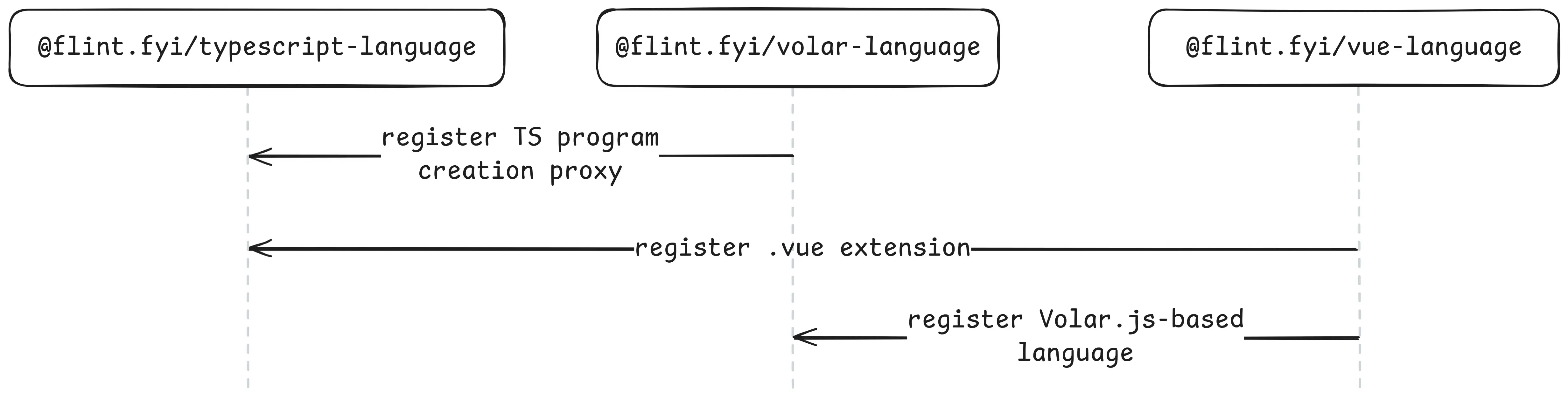

Let’s walk through these side-effects:
@flint.fyi/vueimports@flint.fyi/vue-language@flint.fyi/vue-languageimports@flint.fyi/volar-language@flint.fyi/volar-languageregisters global TypeScript program creation proxy@flint.fyi/vue-languageregisters.vueextension as supported by TypeScript globally@flint.fyi/vue-languageregisters its Volar.js language plugin in a global list
At this point, every TypeScript program created by @flint.fyi/typescript-language supports .vue files natively.
Yes, it’s that simple!
By importing @flint.fyi/vue, you enable all TypeScript-only rules to support .vue linting.
No additional configuration needed!
TypeScript program creation
Section titled “TypeScript program creation”@flint.fyi/typescript-language uses TypeScript Project Service internally.
Thanks to the Project Service, lint rules can request type information even for files that aren’t included in tsconfig.json.
One of the important things that we considered when we were designing Volar.js integration was zero-config support for TypeScript-based languages in the Project Service.
Let’s walk through how Flint does it.
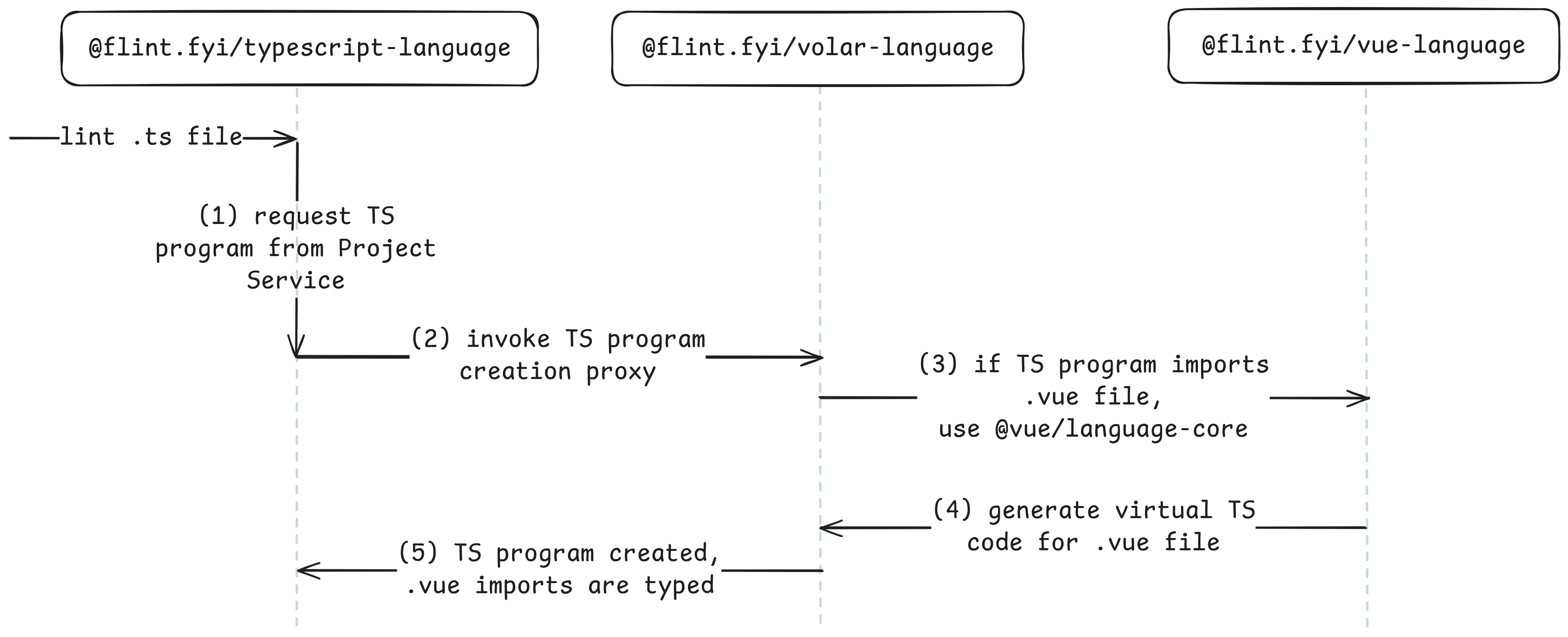
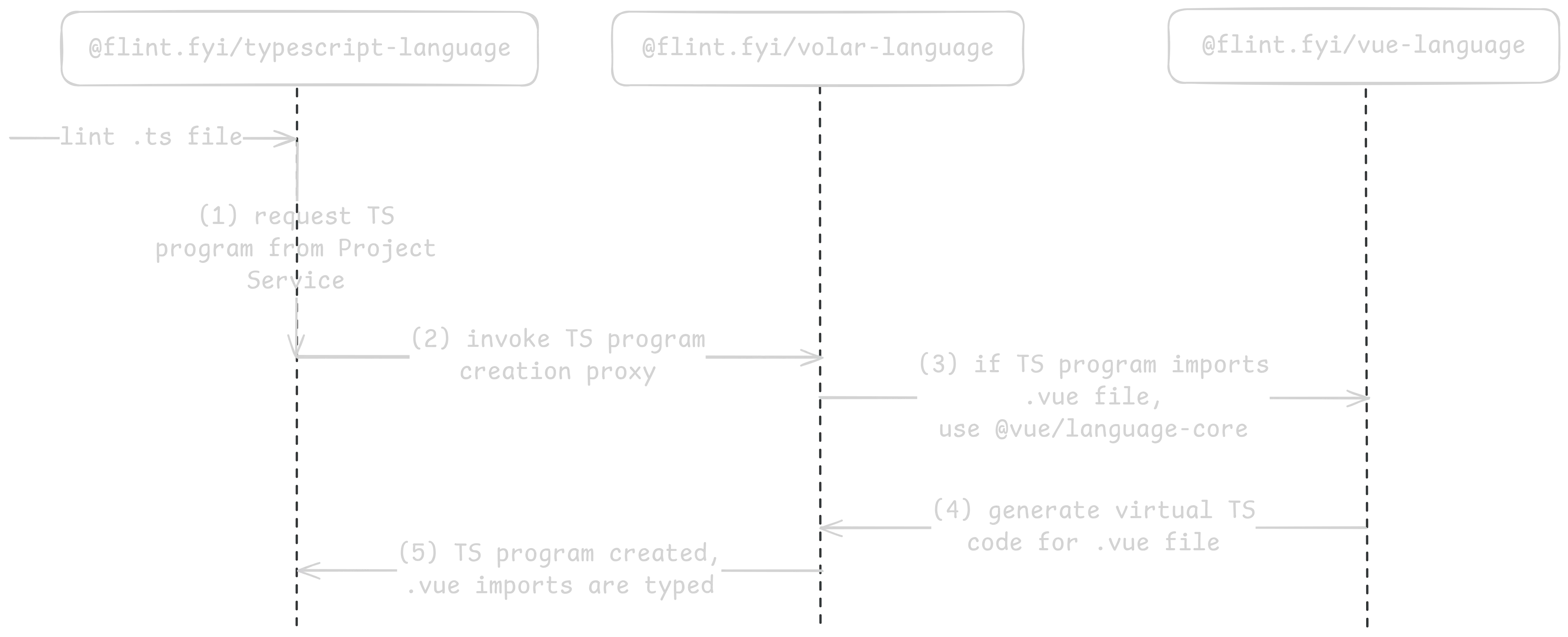
- The stateful
@flint.fyi/typescript-languagehas a single shared instance of the TypeScript Project Service. When@flint.fyi/typescript-languagegets a request to lint a certain file, it opens this file with Project Service. Project Service looks through already opened TypeScript programs and searches for the requested file. If no existing file is found, Project Service builds a new TypeScript program. - Thanks to Flint’s implicit initialization, all TypeScript program creation requests are proxied through a special Flint hook.
If this hook finds out that the TypeScript program creation needs to be customized by
@flint.fyi/volar-language, it relays the request to the Volar.js-specific hook.@flint.fyi/volar-languagehas access to all Volar.js language plugins registered globally at the initialization stage. It then uses Volar.js’proxyCreateProgramutility to enhance the default TypeScript program behavior with custom language support. - In our case, the Volar.js language plugin provided by the official
@vue/language-coreis registered by@flint.fyi/vue-languageto be used to customize the TypeScript program creation. - When the TypeScript module resolution algorithm decides that it wants to load a
.vuefile, it relays the request to that Volar.js language plugin. This way, all.vuefiles are loaded into the TypeScript program as if they were just.tsfiles. - And finally,
@flint.fyi/typescript-languagegets a newly created fully-functioning TypeScript program.
These TypeScript programs created by the Project Service are later used to perform the actual type-checking and type-aware linting.
Linting
Section titled “Linting”All Flint rules created from languages based on @flint.fyi/volar-language can lint .ts files as well.
Rule authors can distinguish between .ts and .vue files by the presence of the services.vue property.
For .vue files, services.vue provides the Vue SFC AST as well as other handy items.
ruleCreator.createRule(vueLanguage, { setup(context) { return { visitors: { SourceFile(node, services) { if (services.vue == null) { // we're linting .ts file } else { const { sfc } = services.vue; // we're linting .vue file } }, }, }; },});Since the Vue language in Flint is a superset of the TypeScript language, lint rule authors can use both Vue and TypeScript ASTs in order to perform type-aware linting of Vue <template>s!
Another benefit of the TypeScript language being a strict subset of the Vue language is that all TypeScript-only lint rules can work on all JavaScript expressions in .vue files even if they weren’t intended to work there.
To sum up, both Vue and TypeScript files are linted as if they were TypeScript files.
However, when rules are run on Vue files, they can optionally access the original Vue file AST, the original source text of the .vue file, and so on.
Flint in action!
Section titled “Flint in action!”Let’s explore how all of this works!
We have the following project layout:
package.jsonflint.config.tssrc/ index.ts comp.vueNow, let’s look at flint.config.ts:
import { defineConfig, ts } from "flint";import { vue } from "@flint.fyi/vue";
export default defineConfig({  use: [    {      files: [ts.files.all, vue.files.all],      rules: [        ts.rules({          anyReturns: true,          anyCalls: true,        }),        vue.rules({          vForKeys: true,        }),      ],    },  ],});
Note how the ts and vue languages coexist in the config without any cross-language configuration.
We configure both Vue and TypeScript rules to run on **/*.ts and **/*.vue files.
Next, let’s look at src/index.ts:
import comp from "./comp.vue";
function vueComponent() {  return comp;}
declare const anyValue: any;function any() {  return anyValue;}
Here, we’re interested in the results produced by the ts/anyReturns rule.
It reports return X statements where the type of X is any.
In this file, we have two possible candidates for a report.
return comp— returns a Vue component. This line is reported by ESLint unless you usetypescript-eslint-parser-for-extra-files. However, we would like Flint not to report it, since this is a legitimate usage.return anyValue— returnsany-typed value. This is unsafe, so we would like this return statement to be reported.
Let’s proceed to src/comp.vue:
<script lang="ts" setup>  declare const anyFunction: any;</script>
<template>  <button    @click="      () => {        anyFunction();      }    "  >    Click me!  </button>
  <div v-for="i in 3"></div></template>
Here, we’re calling anyFunction whose type is any; we want ts/anyCalls rule to catch this unsafe behavior.
Notice how this function is called from the JavaScript expression embedded in the <template>.
ESLint is unable to catch this.
In addition, we introduced <div v-for="i in 3"></div>, which lacks a :key directive.
This is unsafe, so we would like Flint to report it as well.
And finally, let’s run Flint:
> npx flint --presenter detailed
Linting with flint.config.ts...╭./src/index.ts│ │ [ts/anyReturns] Unsafe return of a value of type `any`.│ │ 6:18 │ function any() { return anyValue }│      │                  ~~~~~~~~~~~~~~~│ │  Returning a value of type `any` or a similar unsafe type defeats TypeScript's type safety guarantees.│  This can allow unexpected types to propagate through your codebase, potentially causing runtime errors.│ │  Suggestion: Ensure the returned value has a well-defined, specific type.│ │  → flint.fyi/rules/ts/anyreturns│ ╰╭./src/comp.vue│ │ [ts/anyCalls] Unsafe call of `any` typed value.│ │ 6:27 │ <button @click="() => { anyFunction() }">Click me!</button>│      │                         ~~~~~~~~~~~│ │  Calling a value typed as `any` or `Function` bypasses TypeScript's type checking.│  TypeScript cannot verify that the value is actually a function, what parameters it expects, or what it returns.│ │  Suggestion: Ensure the called value has a well-defined function type.│ │  → flint.fyi/rules/ts/anycalls│ │ [ts/vForKeys] Elements using v-for must include a unique :key to ensure correct reactivity and DOM stability.│ │  8:8 │ <div v-for="i in 3"></div>│      │      ~~~~~│ │  A missing :key can cause unpredictable updates during rendering optimizations.│  Without a key, Vue may reuse or reorder elements incorrectly, which breaks expected behavior in transitions and stateful components.│ │  Suggestion: Always provide a unique :key based on the v-for item, such as an id.│ │  → flint.fyi/rules/vue/vforkeys│ ╰
✖ Found 3 reports across 2 files.
Cool! What do we have here:
function vueComponent() { return comp }is not reported! The type of thecompidentifier is resolved to a valid Vue component type. It’s no longer anany.function any() { return anyValue }is reported byts/anyReturns. This shows us thatreturn compwasn’t reported not because the rule is broken. In fact, it’s functioning as expected, reporting allany-typed values returned from functions.@click="() => { anyFunction() }"in Vue<template>is reported by thets/anyCallsrule. We can see that the TypeScript-only rule works in Vue templates just fine!<div v-for="i in 3"></div>is reported byvue/vForKeys. Vue rules can access the Vue AST and analyze it.
What’s next
Section titled “What’s next”Flint is still in its early pre-alpha stages. We’re excited to show off this early technical preview of the novel architecture we’re building into the linter.
The next steps for Flint’s languages support are:
- Implement all Astro, Svelte, and Vue rules in their Flint plugins
- Investigate support for other TypeScript-based languages such as Ember and MDX
If you’re interested in helping build out a new experimental linter, we’d love to have you join us. At the very least, see About for how to get started using Flint as a user. Trying out the project and telling us about your experience on the Flint Discord would be immensely helpful.
The GitHub issue tracker is where you can find our list of upcoming work. See our Contributing guide for how to find issues that you can get started on. Feel free to ask for help if you’re new and unsure. We’re happy to assist you.
Supporting Flint Financially
Section titled “Supporting Flint Financially”Flint can receive donations on its Open Collective. Your financial support will allow us to pay our volunteer contributors and maintainers to tackle more Flint work. As thanks, we’ll put you under a sponsors list on the flint.fyi homepage.
Further Reading
Section titled “Further Reading”See What Flint Does Differently for a large list of the other architectural decisions Flint is trying out.